

I Almost Lost My Crypto by Sending It on the Wrong Network. Here’s What I Learned About Crypto Networks (and How You Can Avoid My Mistake)

Hi, this is NorthRay.
Remember when I told you I bought Bitcoin on Binance?
I was happy. Proud of myself. I felt like a real crypto investor.
Then I thought, “Why not transfer some crypto to another wallet? Just for experience. Let’s see how it works.”
I opened my wallet, copied the address, and clicked Send.
Binance asked me to choose a network. I saw a list: BEP20, ERC20, TRC20, and a bunch of other confusing abbreviations.
“What’s the difference?” I thought. “I’ll just pick one.”
And I almost lost my money forever.
Luckily, at the last moment, I decided to Google it and double-check everything.
Today I’ll explain what crypto networks are, why you should never mix them up, and how I saved my transfer.
What Is a Cryptocurrency Network? (Simple Explanation)
A cryptocurrency network is the infrastructure that moves your coins. Think of it as a road that a car travels on.
The same cryptocurrency (for example, USDT or Bitcoin) can exist on different networks. It’s like shipping the same package using different transportation routes.
Imagine you need to send a package from one city to another:
-
A toll highway — fast but expensive.
-
An older road — cheaper but slower.
-
A train — different method, different rules.
These are different “networks.”
The package is still the same (USDT), but the delivery route changes.
Crypto works the same way. The same token can exist on multiple networks, and each network has:
-
Its own address format
-
Its own fees
-
Its own speed
The Most Important Rule
When you send cryptocurrency, the sender’s network and the recipient’s network must match.
If you send USDT via BEP20 to an address that only supports ERC20, your funds may be lost permanently.
The Most Popular Networks You Should Know
I learned the main networks so I wouldn’t make this mistake again.
1. ERC20 (Ethereum Network)
Common coins: USDT, USDC, DAI, and many other tokens.
Pros:
-
Supported by almost every wallet
-
The most widely used network
Cons:
-
High fees (sometimes $5–20 per transaction)
Best for:
-
Large transfers
-
DeFi (decentralized finance) applications
2. TRC20 (Tron Network)
Common coins: USDT, TRX
Pros:
-
Low fees (usually around $1–2)
-
Fast transfers
Cons:
-
Not supported by every wallet
Best for:
-
Small and medium-sized transfers
-
Saving on transaction fees
3. BEP20 (BNB Smart Chain)
Common coins: USDT, BNB, and many other tokens.
Pros:
-
Very low fees (often just a few cents)
-
Fast transactions
Cons:
-
Requires some understanding of the BNB Smart Chain ecosystem
Best for:
-
Transfers within the Binance ecosystem
-
Using decentralized applications (dApps)
4. Bitcoin Network (Native BTC)
Common coins: Bitcoin (BTC) only
Pros:
-
Maximum security
Cons:
-
Higher fees (sometimes $10+)
-
Slower transactions (can take an hour or more)
Best for:
-
Large Bitcoin transfers
-
Long-term storage
5. Solana
Common coins: SOL, USDT, USDC
Pros:
-
Extremely fast
-
Very low fees
Cons:
-
Occasional network outages
Best for:
-
Fast and inexpensive transfers
My Advice for Beginners
For USDT transfers, TRC20 and BEP20 are usually the most practical options. They’re fast, inexpensive, and widely used.
For Bitcoin, use the native Bitcoin network unless you fully understand the alternatives.
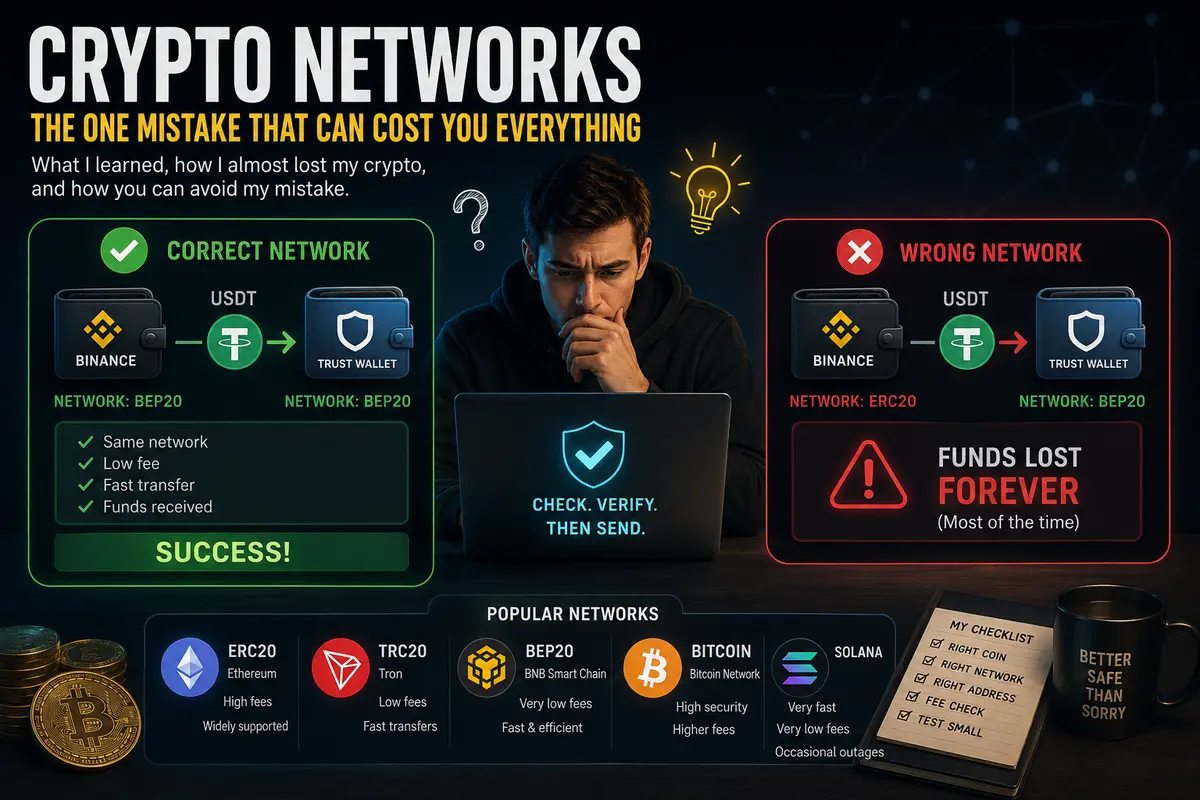
What Happened to Me (and How I Avoided Disaster)
I wanted to transfer some USDT from Binance to another wallet (Trust Wallet).
Here’s what I did right:
First, I copied the address from Trust Wallet.
The wallet showed that it supported multiple networks.
Then I went to Binance, selected USDT, and clicked Withdraw.
Binance asked me to choose a network.
Instead of clicking randomly, I searched Google for:
“Which network should I choose to transfer USDT from Binance to Trust Wallet?”
I found a guide and discovered that my wallet supported BEP20 (BNB Smart Chain) for this transfer.
So I selected BEP20, entered the address, and sent the funds.
The transfer arrived in about 30 seconds.
The fee was only a few cents.
What Could Have Happened
If I had selected the wrong network, I could have sent my funds somewhere they weren’t accessible.
Binance does display a warning.
It’s just that many people don’t read it.
I did.
And it saved my money.
Why Networks Matter So Much (and Where Beginners Usually Make Mistakes)
The biggest beginner mistake is thinking that crypto is just “digital money” that can be sent anywhere.
It doesn’t work that way.
Think of It Like Banking Systems
When you send money through different banking rails, they follow different systems and rules.
Crypto networks are similar.
If the destination isn’t compatible with the route you choose, the transfer may fail—or become very difficult to recover.
Common Beginner Mistakes
-
Sending USDT on ERC20 to an address that only supports TRC20.
-
Sending Bitcoin to an Ethereum address.
-
Not checking which networks the receiving wallet supports.
-
Clicking “Send” too quickly without reading exchange warnings.
My Personal Pre-Transfer Checklist
After this experience, I made a rule.
Before every transfer—even if it’s only $10—I go through this checklist.
Crypto Transfer Checklist
✔ Which cryptocurrency am I sending? (BTC, USDT, ETH, etc.)
✔ Which network does the receiving wallet support?
✔ Which networks does the exchange offer for withdrawal?
✔ Do the networks match exactly?
✔ Is the recipient address correct?
✔ Do I understand the transaction fee?
Golden Rule
If I’m unsure, I send a small test transaction first.
Just $5.
If it arrives successfully, I send the rest.
What If You Already Sent Funds on the Wrong Network?
I’ll be honest: the chances of recovery can be limited.
But it depends on the situation.
Scenario 1: The Destination Supports Multiple Networks
Some exchanges and wallets can recover funds for a fee.
You’ll usually need to contact support, explain what happened, and sometimes pay a recovery fee.
Scenario 2: The Destination Does Not Support That Network
Recovery may be extremely difficult or impossible.
The funds remain on the blockchain, but the recipient platform may have no way to access them.
Scenario 3: You Sent Funds to a Large Exchange
Major exchanges sometimes offer recovery services for certain cases.
You’ll typically need to contact support and verify ownership of the transaction.
My Conclusion
It’s much easier to avoid the mistake than to recover from it later.
What I Learned Today
First: Crypto networks are not a technical detail. They’re one of the most important concepts to understand before making your first transfer.
Second: Never rush. Thirty seconds of checking can save hours of stress and a lot of money.
Third: Always verify that the receiving wallet supports the network you’ve chosen.
Fourth: For USDT, beginners often prefer TRC20 or BEP20 because of their low fees and speed.
Fifth: If you have any doubts, send a small test transaction first. It’s the cheapest peace of mind you can buy.
What’s Next?
-
I’m continuing to learn about crypto networks. In a future post, I may cover how to choose a wallet for long-term storage.
-
My $100 worth of Bitcoin is still sitting on Binance. I’m not touching it—just observing.
-
If people are interested, I’ll write about moving crypto from an exchange to a cold wallet once I’m ready.
If you’re just starting your crypto journey, remember this one rule:
Sender’s network = Recipient’s network
That simple rule can save you both money and headaches.
— NorthRay
(With a clear head, verified networks, and my first successful crypto transfer—without losing a single coin. Thank you, internet.)

Comments
No comments yet. Be the first to share your thoughts!
Comments only for logged-in users.